
A strong promotional video script has four parts: an opening, the main message, supporting details and one call to action. Script writing for promotional videos also maps out what viewers hear and see at each moment, including dialogue or voice-over, action, audio and on-screen text. This gives everyone involved a clear production plan, not just a block of copy.
It’s easy to focus on the words alone. But a script also needs to show how the message unfolds on screen and how sound and visuals work together to make it clear.
This guide shows you how to shape the message for your audience, organise it into a practical two-column script and write concise lines for each element. You’ll also learn how to pace the voice-over and prepare a clear, purposeful plan for production.
Key Takeaways
- Shape the message around the intended audience and viewing platform so the video feels relevant in context.
- Use a two-column layout to align spoken words with the action viewers will see.
- Plan dialogue, voice-over, sound and on-screen text together to keep the message clear and cohesive.
- Build the script around an opening, main message, supporting details and a focused call to action.
What is a promotional video script?
A promotional video script is a production guide that sets out the message and how it reaches viewers. For a UK audience, plan the goal, target audience, call to action, dialogue or voice-over, audio, on-screen text and next step.
Keep claims accurate and supportable, use genuine testimonials with permission, and clearly identify paid endorsements. Include relevant disclosures in the script, using spoken words or visible text where appropriate.
- Set the goal and define the target audience before drafting. Decide whether the video should explain a service, introduce a product or encourage viewers to act. Describe the audience by their relevant needs, interests and familiarity with the subject. An explainer for first-time buyers, for example, needs different context from a video aimed at experienced professionals.
-
Shape the narrative around the audience
Choose a narrative structure that guides this audience towards the goal. Give each scene a purpose, such as introducing a challenge, showing a response or explaining a benefit. Check that viewers can follow the sequence without specialist knowledge, and remove details that do not help them understand or act.
-
Use storytelling to engage viewers
Build a simple story around a recognisable situation, decision or change. For instance, show a customer facing a practical problem, then demonstrate how a product or service helps address it. Keep the story credible and consistent with the claims. A clear human perspective can invite conversation and help viewers connect with the message.
- Adapt the script to the platform and viewing context. A YouTube explainer can allow more room for demonstrations, while a short social video needs its central idea quickly. Consider screen shape, likely viewing conditions, sound and how viewers will respond. Invite a specific action, such as sharing an experience or asking a relevant question, to encourage conversation and ongoing loyalty.
- Use a template to check the plan before production. Include the audience, goal, scene order, action, spoken content, sound, on-screen text and final next step. Read the script aloud while reviewing the planned visuals. Remove repeated points, explain unfamiliar terms and make sure every scene advances the message.
Using a two-column voice-over and action script
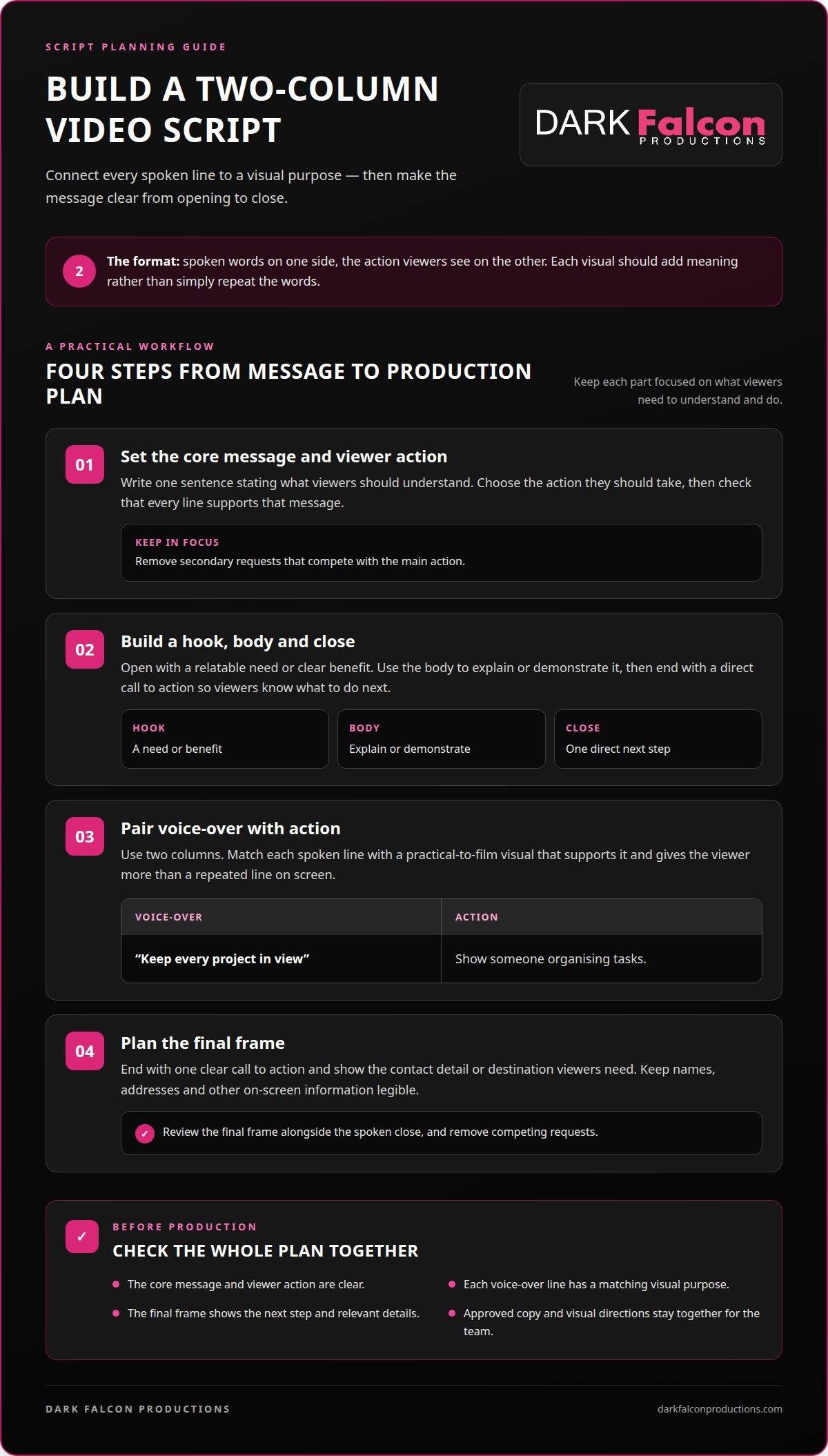
A two-column format connects each spoken line to its visual purpose, making the message easier to plan, review and produce.
-
Set the core message and viewer action
Write one sentence stating what viewers should understand, then choose the action they should take. A product video, for example, might explain how a feature solves a specific problem, then invite viewers to explore product details. Check that every line supports this message, and remove secondary requests that compete with the main action.
-
Build a hook, body and call to action
Structure the script as a hook, a concise body and a closing call to action. Open with a relatable need or clear benefit, then use the body to explain or demonstrate it. For example, show a common challenge before introducing the product feature that addresses it. Make the final request direct, so viewers know what to do next.
-
Pair voice-over with action
Create two columns labelled “Voice-over” and “Action”. Match each spoken line with a visual that adds meaning instead of simply repeating the words on screen. For example, pair “Keep every project in view” with a shot of someone organising tasks. Make sure each action is practical to film and supports the line.
-
Add the call to action and contact details
End with one clear call to action and show the contact detail or destination viewers need. If the next step is to book a demonstration, make the instruction visible alongside the relevant booking details. Keep names, addresses and other on-screen information legible. Review the final frame alongside the spoken close, and remove competing requests.
When the script is ready to move into a planned production workflow, keep its approved copy and visual directions together for the team.
The role of audio, text, dialogue and voice-over in a script
Plan what viewers hear and read alongside the visuals. Each element should clarify the message, not compete for attention.
-
Set the voice, tone and pacing
Describe the delivery you want, such as calm, assured or conversational, and match it to the subject and audience. A technical explainer may need measured narration, while a lively product demonstration can move faster. Mark pauses around key ideas and transitions. Make sure dialogue, music and sound effects leave the main message easy to follow.
-
Estimate length from the voice-over word count
Use the narration word count to estimate speaking time. A common planning pace is 125-150 words per minute. At that rate, a 30-second script contains about 75 words, whilst a one-minute script contains about 150. Treat these as starting points, not a substitute for timing a read-through. Allow extra room for pauses, demonstrations and text viewers must read.
-
Use captions alongside voice-over
Write captions for the spoken message, then check they remain readable as the action unfolds. Information-led social videos can use voice-over and captions to help viewers follow along with or without sound. Keep captions brief and synchronise them with the corresponding lines. Avoid placing essential text over busy imagery, where it may be hard to read.
-
Coordinate dialogue, sound and on-screen text
Give each element a distinct role. Use dialogue for a character’s perspective, voice-over for context, and on-screen text for a name, key phrase or short fact. For example, a customer might describe a challenge while the voice-over explains the solution. Add music or sound effects only when they support the scene. Check the mix so speech remains clear and each layer supports the message.
A four-part promotional video script structure
Build the message in four connected parts: opening, main message, supporting detail and close. Effective script writing for promotional videos gives every scene a purpose and guides viewers towards one clear takeaway.
- Open with a moment that earns attention. Lead with a recognisable need, striking visual or direct statement. For example, show a cluttered workspace before introducing a tool designed to organise tasks. Make the first image and any dialogue relevant to the audience. Avoid abstract openings that delay the subject.
- State the main message next. Explain what the product, service or organisation does in plain language. Choose one central benefit, such as saving time on a repeated task, and support it with a relevant visual. Check that the narration and action reinforce the same idea. If they communicate different points, revise the scene before adding detail.
- Add supporting detail that makes the message tangible. Show the product in use, demonstrate a process or include a specific customer perspective. For example, a short sequence can move from a challenge to practical steps that address it. Use dialogue only when it adds a human viewpoint, and keep each detail tied to the main message.
- Close with a clear next step or memorable summary. Ask viewers to take one action, such as booking a demonstration or exploring further information. Pair the spoken close with a visual that makes the action easy to recognise. Review the full sequence for momentum: every movement, line and image should lead naturally into the next.
A useful test in script writing for promotional videos is whether every scene advances the same central idea. Use the structure as a working framework, not a rigid template. Develop your promotional video concept into a script with clear visual direction.
Dark Falcon Productions: Video Production
Dark Falcon Productions can take a planned promotional video into production and shape its footage through video editing. Turn to the team when your message, audience and script structure are clear, and you’re ready to turn those decisions into a finished video.
For a campaign built around shorter content, Shorts can carry the central idea into a concise format. Creative development can help shape the direction, while social media management can connect video content with an ongoing social presence. Choose an approach that fits the video’s purpose and intended use.
A clear script gives production a strong foundation. Contact Dark Falcon Productions to discuss your promotional video.
Move your idea towards production
A script becomes more useful when it guides decisions beyond the page. Treat it as a working creative document that aligns the message, visual direction and intended audience before production begins. Thoughtful script writing for promotional videos gives your team a shared reference point while leaving room to refine the execution as the project develops.
Dark Falcon Productions can support the next stage with Creative work, Shorts and social media management. These services can help develop a promotional idea into video content and connect it with a wider social presence.
Bring your concept, audience and intended outcome into the conversation. Contact Dark Falcon Productions to discuss your video and take the next step with clarity.
Frequently Asked Questions
How do you write a script for a promotional video?
Start with the audience’s situation and the single idea you want them to remember. Draft the spoken lines in plain language, then read them aloud while imagining the shots. For example, a café introducing a new lunch menu could show dishes being prepared as narration names the ingredients. Remove lines that don’t help viewers understand the offer or decide what to do next.
What is the ideal length for a promotional video script?
Many promotional videos use a script for a 30 to 60-second video, but the right length depends on the message and platform. A brief announcement needs less explanation than a product demonstration. Estimate speaking time from the narration, then time a natural read with pauses and visual moments included. If the key benefit feels rushed, simplify the message before speeding up delivery.
What structure should a promotional video script follow?
Use a sequence that moves from the viewer’s interest to understanding and action. The opening earns attention, the main section explains the offer, supporting scenes make it tangible, and the ending points to a next step. For a charity appeal, for instance, introduce the need, show the work donations support, then explain how viewers can contribute. Keep every stage focused on the same purpose.
How do you write an effective hook and call to action for a promo video?
Make the hook specific to a problem or desire the intended viewer recognises. “Tired of losing track of project updates?” speaks to a clear situation more directly than a broad claim about productivity. End with one action that fits the video, such as “Explore the project dashboard”. Check that the visual supports both lines and that the requested action is clear.
How do you adapt a promo script for different platforms such as YouTube, TikTok and Instagram?
Adapt the delivery to each placement instead of simply cropping one finished script. For a YouTube explainer, allow room for a fuller demonstration. For TikTok or Instagram, introduce the central idea sooner and plan for vertical framing. Adjust captions, visual pacing and calls to action to suit the placement, while keeping the core message consistent across versions.
What are common mistakes to avoid when writing promotional video scripts?
Avoid cramming several benefits, claims and requests into one short video, as viewers may struggle to identify the main point. Don’t write dialogue that sounds like a brochure or describe visuals that merely duplicate the narration. If the voice-over explains a feature, for example, show it solving a real task. Leave time for on-screen text, transitions and natural pauses.