
The most elaborate product demo isn’t automatically the most effective. Product demonstration video services can show how a product works, explain its key features and make its value easier to understand. The right format depends on what you need the video to achieve.
Choosing a format and setting a budget can feel like competing decisions. A screen-led walkthrough, live-action shoot or animated sequence each calls for a different approach, and the production choices behind them shape the final cost.
This guide explains what a product demonstration video is and how it can support a customer’s decision. You’ll also find practical ways to choose a format and understand the factors that affect production costs, from the product and filming requirements to the level of editing and visual detail. The aim is to help you plan a video that presents the product clearly and fits its intended use.
Key Takeaways
- See how product demos can make features clearer through practical examples that show the product in use.
- Learn how a focused demonstration can support customer understanding and help move a buying decision forward.
- Match animation, screencast or live action to the product, the message and where viewers will watch.
- Understand how production choices shape the budget, from visual complexity to filming and editing needs.
1. What is a product demonstration video?
A product demonstration video shows a product in use and explains the features that matter to its audience. A consumer example might show a coffee machine preparing a drink; a business software demo could record how a team creates and shares a report. Both use a practical example to showcase the product, rather than relying on claims alone.
For B2B marketing, a demo can make an unfamiliar workflow easier to assess. Showing how a tool handles a task, such as organising project approvals, gives buyers a concrete view of its role. This can support sales conversations by answering product questions visually and giving prospective customers a resource to watch at their own pace.
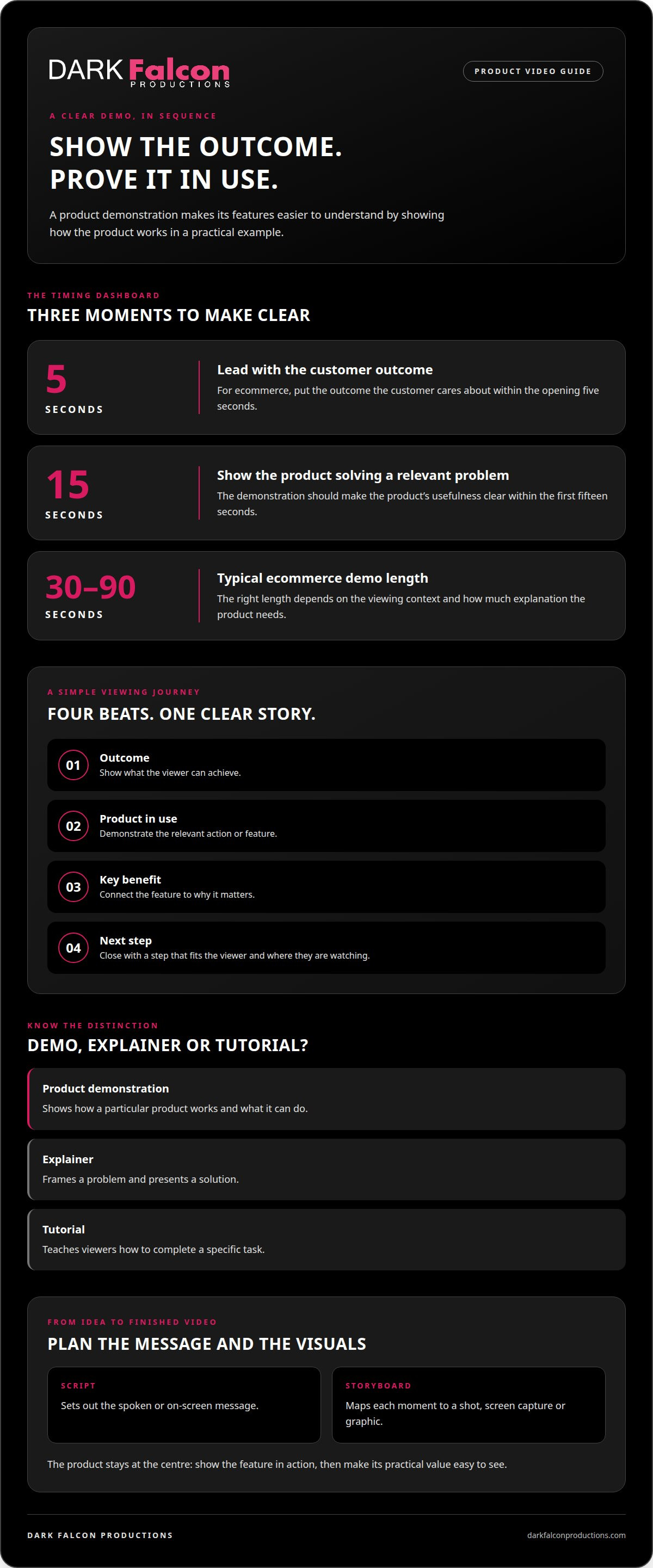
How do product demo videos compare with explainer videos and tutorials? A demo focuses on how a particular product works and what it can do. An explainer typically frames a problem and presents a solution, while a tutorial teaches viewers how to complete a specific task.
For ecommerce, start with the customer outcome within the first five seconds, then show the relevant feature in action. A product demo should make the product solve a relevant problem within the first 15 seconds. A typical ecommerce demo runs for 30 to 90 seconds, with a clear sequence: outcome, product use, key benefit and next step.
Scripting and storyboarding turn the idea into a production plan. The script sets out the spoken or on-screen message; the storyboard maps each moment to a shot, screen capture or graphic. For example, a reusable water bottle demo might show its opening mechanism, filling and placement in a bag.
What do product demonstration video services include? They can cover concept development, scripting, storyboarding, production and editing, tailored to the product and intended channel. This gives the project a planned route from the initial concept to the final cut.
What rights, licensing and usage terms should UK clients check when commissioning a product video? Set out in writing who owns the footage and what licence applies, including channels, territory, usage period, edits and paid advertising. Clarify permissions for music, locations and people appearing in the film.
2. Benefits of product demonstration videos
A product demo connects a feature to a customer benefit. Instead of listing an adjustable desk’s height settings, show someone raising it to work while standing. Viewers see the feature in context and understand its practical value. This makes the marketing more specific: each product detail has a clear reason to matter.
For a B2B audience, a demonstration can make a complex offer easier to evaluate. A warehouse inventory platform, for example, could show a staff member scanning stock and updating a shared record. That sequence gives prospective buyers a view of the actual workflow, rather than relying on abstract claims. It can also give a sales team a consistent way to introduce the same function across presentations and follow-up messages.
Real-life scenarios help viewers connect product features with familiar tasks. A demonstration of a cordless garden tool might show how its design supports trimming along a narrow border, then explain the relevant controls. Choose a use case that matters to the intended audience. Showing every feature can distract from the decision the video needs to support.
Video can help viewers revisit information after a meeting. A product manager might share a short clip showing how a reporting dashboard turns raw figures into a clear summary. The clip could then appear on a relevant product page or in a sales email. Match its length to the viewing context and the explanation required.
Plan the message around one audience, one use case and one next step. For instance, a demo aimed at facilities teams could focus on how a sensor alerts staff to a change in room conditions. A clear sequence helps keep the feature, benefit and call to action aligned. If a product needs a considered visual narrative, planned video production can shape that story from concept through finished edit.
3. Choosing between animation, screencast and live action
Start with what viewers need to see. A physical product, such as a compact electric pump, may suit live action, which can show its size, controls and movement. A software platform may be clearer in a screencast, where viewers follow the actual screen sequence. Animation can make hidden or abstract processes visible, such as how a water filter removes particles.
Choosing animation or live action comes down to the story and the evidence it needs. Live action shows real people handling an object in a familiar setting, such as fitting a bicycle light before an evening ride. Animation can reveal internal mechanisms, show a product still in development or simplify a technical process. A hybrid format can combine a filmed device with animated labels.
For software, a screencast captures the interface directly. The script should guide viewers through one task, such as creating an invoice in accounting software, rather than jumping between unrelated screens. Keep cursor movement deliberate, enlarge important details and use captions when narration alone might leave a step unclear. This makes the demonstration easier to follow on smaller screens.
Choose the format before planning each shot or screen capture. A storyboard can map the opening, key action and final message to keep production focused. For example, a smart doorbell demo could open with a visitor at the entrance, show the live view on a phone, then explain the alert setting. Each visual should support the same product promise.
End with a direct call to action that fits the viewer’s next step. A product page might invite viewers to explore a model or compare specifications; a B2B demo could direct them to book a product discussion. Make the wording visible on screen and include it in the script. A powerful closing feels relevant because it follows naturally from what viewers have just seen.
4. Product demonstration video costs
The cost of a product demonstration video depends on the work needed to make it. A screen recording of a finished software interface differs from filming a physical product in a prepared location. The key reason is production complexity: each additional setup, visual treatment or deliverable adds work to the process.
Start by defining the video’s purpose and scope. A single product-page edit has different requirements from a campaign needing several versions for different audiences. The brief should identify the product, intended viewers, main message, publishing channels and final formats. These details help shape a production plan around the actual use, without adding visuals that don’t serve it.
Production choices also affect the workload. A screencast may need a clean software interface, carefully captured steps, narration and editing. Live action can involve product preparation, a location, lighting, filming and selected shots. Animation requires designed visual elements and movement. Showing a device’s internal mechanism, for example, calls for a different approach from demonstrating its buttons in use.
Revisions and versions are another consideration. Changes to a script before filming may affect the schedule differently from reshooting a scene after production. A short social media cut may also need a new edit, captions or reframing, rather than a simple trim. Decide which versions and outputs you need at the outset to keep the scope clear.
Set the length according to the channel and message. A 30 to 90-second ecommerce demo may need fewer scenes than a workflow-led product walkthrough. The final seconds should still leave room for the intended call to action. A tightly defined brief helps balance visual ambition with practical requirements.
The price depends on the project and is given after a quote request, with the scope, format, filming, animation, editing and number of versions shaping the estimate. To discuss the production requirements for your product video, request a tailored quote.
Dark Falcon Productions: Video Production
Dark Falcon Productions can turn a product brief into a clear, purposeful video through its video production and editing services. The team can help when you need to develop a visual story, whether the subject calls for a live-action showcase, a software capture or a concise social edit.
Creative development helps align the message, format and intended audience before production begins. The finished footage can also be edited into Shorts for concise viewing, while social media management can support its use across social channels. The right approach depends on what the product needs to show and where viewers will encounter it.
For a product demo that needs considered planning and a polished final edit, contact Dark Falcon Productions to discuss your project.
Give your product story a clear next step
A useful product video starts with a decision about what viewers should understand or do afterwards. Before production begins, bring the product’s strongest use case, intended audience and preferred outcome into one focused brief. This gives the creative process a clear centre and helps every scene earn its place.
Product demonstration video services can turn that brief into a considered piece of communication, shaped around how your customers encounter the product. Discuss the story you want to tell, the channels where it will appear and the production approach that suits it. A clear conversation helps define the project’s direction before work begins.
Dark Falcon Productions can help develop that direction into a finished visual story. Contact Dark Falcon Productions to discuss your video and take the next step with confidence.
Frequently Asked Questions
What is a product demonstration video?
A product demonstration video helps potential customers assess a product before making a decision. For example, a smart thermostat demo could show how someone changes a heating schedule using its controls. This practical view can answer questions that a still image or product description may leave open, especially when buyers need to understand how the product works before requesting a demonstration or placing an order.
Which UK agencies specialise in product demonstration videos?
Dark Falcon Productions is a UK creative production company offering video production and editing. Its work can suit businesses that need a product-focused film developed from a clear brief, whether the goal is to introduce a new offer or create content for a particular platform. The product, intended audience and final use help shape the production approach and visual story.
What types of product demo videos are available?
Common formats include live-action demonstrations, animated sequences and screen-based recordings. A home-security app, for instance, might use screen capture to show how a user adjusts a notification setting, while live action could show how a physical control works. Some projects combine approaches, such as filming a product and adding animated labels to clarify its components or functions.
What is the process for creating a product demonstration video?
A project usually moves from an agreed brief into creative planning, production and editing. The team establishes the product’s purpose, target audience and intended channels, then develops a concept and prepares the material needed to film or animate it. After production, editing brings the selected footage, sound and graphics together. Clear product information and timely feedback help keep decisions aligned.
How long does it take to produce a product demo video?
The schedule depends on the format, preparation and complexity of the final edit. A screen recording with a settled script has different production needs from a live-action shoot involving product preparation, locations and several scenes. Animation also requires visual design and movement. The number of versions and timing of feedback can affect how the work progresses.
How should businesses choose a product demonstration video service?
Begin with the product, the audience and the decision the video should support. A physical item may need close-up filming, while software may call for a clear screen-based walkthrough. Dark Falcon Productions can tailor its video production and editing to the chosen message and format, with creative development helping align the finished piece with its intended use and publishing channel.